


Owning a Kiiroo Keon 1 or Keon 2 means you already have one of the most powerful automated strokers on the market. But if you are only holding it by hand, you are missing out on its true potential. Kiiroo offers a full lineup of official attachments, yet most users have no idea what half of them actually do, or how to get the most out of them. Learning how to use Keon accessories unlocks entirely new levels of comfort, positioning, and hands-free control.
This guide delivers a complete breakdown of every single accessory in the lineup. Instead of dry product summaries, you will get real-world use-cases, practical keon accessories tips, and creative keon setup ideas. We will also explore how to pair your physical gear with the broader Kiiroo digital ecosystem, including the FeelConnect app, FeelMe AI interactive scripting, and VR setups, for a fully immersive experience.

What Accessories Are Available for the Keon?
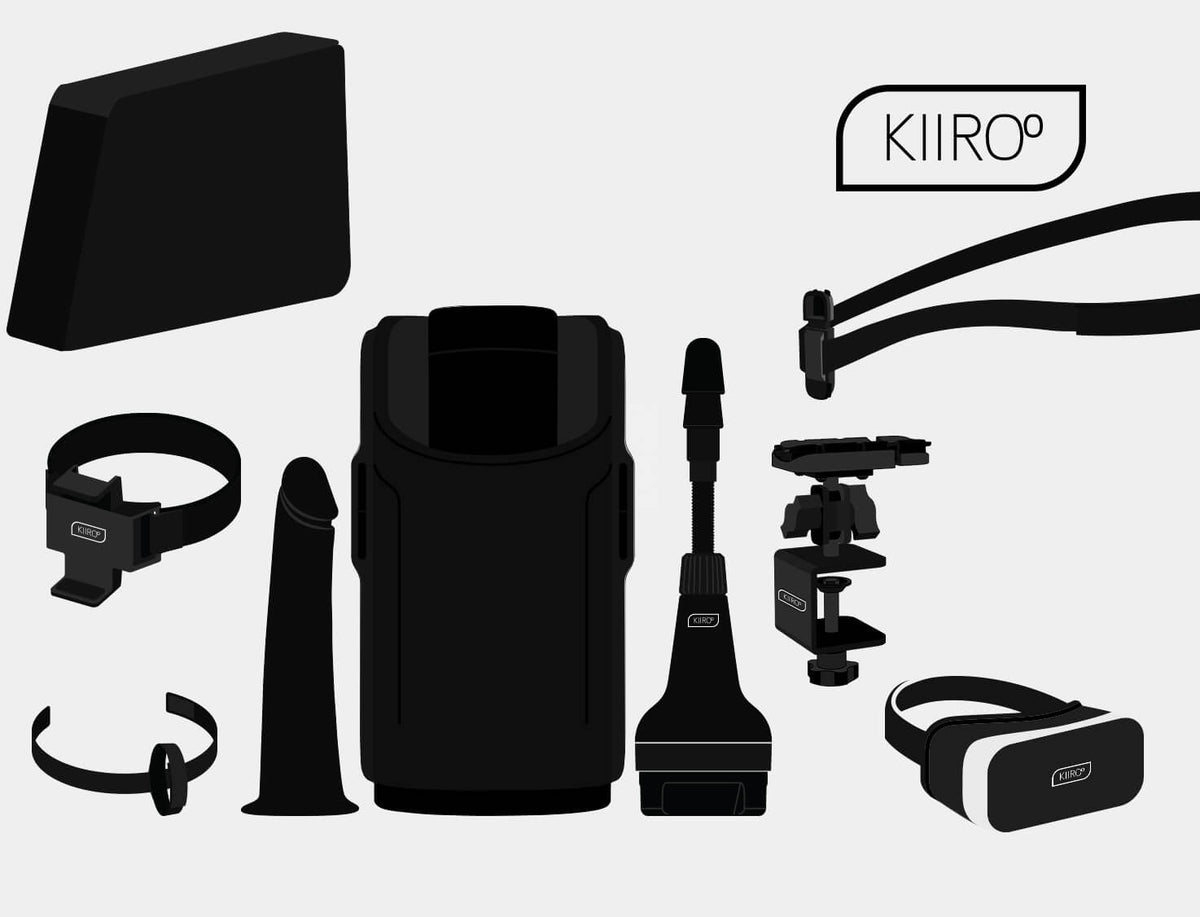
If you want to level up your rig, you can browse all Keon accessories to see what fits your play style. The Kiiroo accessories lineup breaks down into three core functional categories, plus a complete starter pack:
Mounting & Positioning
-
Keon Phone Holder: Elastic bracket securing your smartphone directly to the top housing for line-of-sight viewing.
-
Keon Multifunctional Pillow: High-density contoured foam wedge engineered for thigh-squeezing or furniture placement.
-
Keon Hand Strap: Ergonomic shell strap that eliminates wrist and forearm fatigue during extended sessions.
-
Keon Neck Strap: Heavy-duty harness suspending the device against your chest or waist for hands-free play.
-
Keon Table Clamp: Solid metal clamp locking your device securely to desks, frames, or headboards.
Sleeve Compatibility
-
Keon Compatible Stroker Case: Hollow Keon 1 shell accepting non-Kiiroo sleeves, including standard Fleshlights.
-
PowerShot Compatible Stroker Case: Specialized case wrapping dual vibration motors around your preferred third-party sleeve.
-
Keon 2 Universal Stroker Adapter: Quick-release bridge enabling Keon 2 owners to run third-party strokers seamlessly.
Expansion
-
Keon Dildo Adapter: Replaces the stroker receptacle with a 3-groove Vac-U-Lock stem for automated thrusting.
-
Vacuum Lock Dildo: Premium silicone dildos engineered to lock directly onto the Dildo Adapter.
-
VR Headset (VR Box): Smartphone-based VR goggles built for immersive 3D visual integration.
Buy-Together
-
Keon Accessory Bundle: Starter kit containing the Pillow, Hand Strap, and Phone Holder, one of the simplest ways to use Keon accessories together in a single kit.
Keon 1 vs Keon 2: Which Accessories Work with What?
Before buying new gear, you must verify what actually fits your device. The Keon 2 features a redesigned chassis and a quick-release mounting ring, meaning several legacy Keon 1 accessories will not latch onto the newer body. While universal hardware supports both models, shell-specific straps and holders do not translate across generations.
Here is the compatibility breakdown to ensure you select the right fit:
|
Accessory |
Keon 1 |
Keon 2 |
|
Multifunctional Pillow |
✓ |
✗ (Keon 2 uses different strap system) |
|
Hand Strap |
✓ |
✗ |
|
Phone Holder |
✓ |
✗ |
|
Accessory Bundle |
✓ |
✗ |
|
Neck Strap |
✓ |
✓ |
|
Table Clamp |
✓ |
✓ |
|
Dildo Adapter |
✓ |
Check compatibility |
|
Vacuum Lock Dildo |
✓ |
Check compatibility |
|
Keon 2 Universal Stroker Adapter |
✗ |
✓ (bridge to third-party sleeves) |

Keon Phone Holder: Hands-Free Interactive Play
If you have ever tried balancing your smartphone on a pile of pillows while using your stroker, you know the frustration. The Keon Phone Holder solves this by locking your screen directly to the top housing for line-of-sight viewing.
From a technical standpoint, the holder handles phones with a maximum clamp width of 125 mm and a maximum phone thickness of 16 mm. Pro setup tip: pull the elastic band high up on the front nose of the unit so it stays clear of your phone’s side volume and power buttons.
(Note: Compatible with Keon 1 only.)
Here are the best ways to put it to work:
-
The Neck-Saver: Mounted high on the Keon, your phone hangs directly at eye level when lying back. No more awkward chin-to-chest strain trying to look down for 20 minutes straight.
-
The Travel Bracket: Because the elastic bracket design is so versatile, you can wrap the band around a bedpost, a chair back, or a hotel railing to create a pop-up movie mount anywhere you land, even when the Keon isn't attached.
-
The Partner Window: Mount your phone with interactive content running so your hands stay completely free. Your partner can take total control of your Keon remotely from anywhere in the world using the FeelConnect app.
For full ecosystem integration, pair this setup with the FeelConnect app to sync physical movement with scripted 2D videos, or run FeelMe AI in your browser to translate virtually any video into real-time stroke commands.
Keon Multifunctional Pillow: Positions to Try
The Keon Multifunctional Pillow is easily the most versatile mounting tool in the Kiiroo lineup. High-density foam wedge that transfers motor weight to your thighs or furniture. Exploring creative ways to use Keon accessories like this pillow transforms simple couch play into a hands-free station.
(Note: Compatible with Keon 1 only.)
The Named Position Playbook
-
Cowgirl’s Milking Machine (Front & Reverse): Lie flat on your back and wedge the pillow between your inner thighs.
-
Front Setup: Put the shorter end between your legs so the longer arch points up over your torso, angling the stroker down toward your body. Squeezing your thighs together presses the foam inward for intense counter-pressure. If you are wearing an internal prostate massager or a plug like the Lumen, this angle gently presses against the base of the plug for dual stimulation.
-
Reverse Setup: Flip the pillow so the long arch sits between your thighs, pointing the stroker down toward your toes for a flatter, relaxed angle.
-
The Ragdoll: You can strap a bare stroker sleeve directly to the pillow without using the Keon unit! Because the strap is slightly wide for a bare sleeve, wrap a small towel or t-shirt around the sleeve casing so it holds rock-solid. This gives you a stationary target to move against, which is killer practice for staying in control during top positions.
-
Boston Dynamics: Set the pillow down in a doggy-style or kneeling stance. Try both front and reverse angles here too. If the unit sits too high, toss a pillow under your knees; if it sits too low, stack a cushion underneath the foam base.
-
Standing Ovation / The Bodybuilder: Set the pillow on a height-adjustable chair for standing play. Or, for a true leg-day challenge, squeeze the pillow tightly between your thighs and hold the entire rig in mid-air using pure inner-thigh grip while the motor runs.
-
The Recliner: Place the pillow on the armrest or back cushion of a deep couch or armchair. Sit back so your body weight anchors the foam wedge in place while your laptop plays interactive content straight ahead.
For ecosystem sync, FeelMe AI shines in The Recliner setup, you can kick your feet up and let the browser-based AI drive the motor automatically from whatever video you are watching.
Keon Hand Strap: A More Stable Grip
If you prefer holding your device, long sessions can quickly exhaust your fingers, forearm, and wrist. The Keon Hand Strap wraps securely around the shell, locking your hand against the housing so you don't have to squeeze the hard plastic to maintain control.
(Note: Compatible with Keon 1 only.)
Pro setup tip: When attaching the strap, make sure the soft side of the Velcro on the small loop faces inward toward your skin, or it will scratch your hand during fast-paced movement.
Named Playbook Techniques
-
The Twist Cap: Slide your hand into the loop, then rotate your palm 90 degrees counter-clockwise (if right-handed) or clockwise (if left-handed). Your index finger should point straight up above the control buttons, with your thumb resting across the front. This grip stabilizes the unit with virtually zero squeeze effort.
-
Kettle My Bells: Stand upright and hold the unit purely by the top loop in one hand like a grocery bag or kettlebell, using your second hand underneath the base ring solely to guide the entry angle.
-
The Assistant Grip: Slip your dominant hand through the strap so the Keon stays glued to your palm. This leaves your other hand completely free for sessions longer than 15 minutes where hand fatigue matters, allowing you to navigate the FeelConnect app, scroll through videos, or grab the lube bottle without dropping the motor.
-
The Angle-Changer: The hand-strap grip lets you alter the stroke trajectory on the fly (upward for standing, downward for sitting) without gripping tightly, preventing your wrist tendons from locking up during extended play.
-
The Commuter: For travel, the Keon fits into a gym bag or carry-on side pocket with the strap wrapped tightly around the body shell. It keeps loose parts bundled together, discreetly eliminating rattling while on the go.
For full ecosystem integration, keeping a hand free lets you open FeelConnect mid-session to adjust stroke intensity, switch video streams, or pass interactive control over to a remote partner seamlessly.
Keon Neck Strap: Hands-Free Positions
The Keon Neck Strap is a heavy-duty harness that clips directly into the side anchor points of the housing. It suspends the weight of the motor against your body, letting you go completely hands-free whether you are standing, sitting, or lying down.
(Note: Compatible with both Keon 1 and Keon 2.)
4 Hands-Free Positions to Try
-
The Photographer: Stand upright with the strap adjusted over your neck, letting the stroker hang right at hip level. Walk around, stand, or lean back against a wall while the motor runs. If you have sensitive skin on your neck, loop one side under your armpit to redistribute the weight.
-
The Catfish: Lie flat on your back, place the device on your lap, and loop the strap around your waist underneath you. When you dial in the strap tension, it holds the unit firmly against your pelvis, requiring only a light touch of your hand to steady it at high speeds.
-
No Escape: Sit on a chair or the edge of your bed with your legs slightly apart, place the unit between your thighs, and wrap the strap around your legs to tie them together. If you enjoy bondage, pair this setup with partner play via FeelConnect. Have your partner lock down the restraints and hand them full control of the app for intense tease-and-denial sessions where you physically cannot move away.
-
The Commuter (Couch Edition): Sit back on your sofa and loop the neck strap over the top of the couch cushion or headboard behind your head so the Keon dangles right between your legs. The furniture frame absorbs the motor's weight instead of your spine, making this setup especially useful for longer sessions where neck fatigue becomes a real issue.
For a unique ecosystem setup, pair the neck strap with a phone tucked in your pocket running FeelConnect for walk-around content sync, allowing full physical freedom while the software drives every stroke.
Keon Table Clamp: Mount It Anywhere
When you want 100% rigid, mechanical stability without balancing a cushion on your body, the Keon Table Clamp is the answer. It bolts your device directly to any solid edge, turning your machine into a permanent stationary fixture.
(Note: Compatible with both Keon 1 and Keon 2.)
3 Creative Setups to Try
-
The Command Station: Bolt the clamp to the front edge of your desk, load your sleeve, and run VR content sync or FeelMe AI straight ahead. Hands-free from the second you sit down.
-
The Bed-Frame Mount: If you don't want a desk setup in your bedroom, the clamp locks onto wooden bedposts, side rails, headboards, or heavy chair backs, giving you a discreet bedroom station.
-
The Partner-Mounted Point-of-View: One person mounts the Keon to a low table or bench while the partner sits or stands opposite with a laptop running FeelConnect to take control of every stroke. Long-distance couples can run this exact same setup remotely from anywhere in the world.
Safety & Technical Guidelines
The clamp handles surfaces up to 49mm thick. Only mount it to solid wood, heavy metal, or dense composite materials. Never mount this clamp to glass tables or thin hollow-core veneer desks, the torque from the stroke motor can crack unreinforced surfaces.
Upside-Down Mounting: If your desk is too high, you can mount the clamp upside down so the stroker hangs underneath the surface. Because the device may angle slightly upward in this setup, liquid can migrate toward the back cap. Place a paper towel underneath your rig to catch any stray lube that drips during high-speed sessions.
Keon Dildo Adapter & Vacuum Lock Dildo: Beyond the Stroker
If you want to use your machine for automated thrusting penetration rather than external stroking, the Keon Dildo Adapter replaces the standard sleeve receptacle with an industry-standard Vac-U-Lock connector post.
(Note: Compatible with Keon 1. Verify Keon 2 latching compatibility before purchasing.)
Step-by-Step Installation
-
Drive internal mechanics to the bottom position and power down.
-
Align the 3 plastic tabs on the adapter with the entry tracks inside the front collar.
-
Push firmly and twist counter-clockwise until it locks securely.
-
Press a Vacuum Lock Dildo onto the stem until sealed. Tilt side-to-side to break the air lock when removing.
Third-Party Compatibility & Positioning
Because it uses a standard Vac-U-Lock stem, this adapter opens your machine to a massive range of third-party dildos, including Doc Johnson models and most universal sex-machine attachments on the market.
For penetration, positioning is critical:
-
Table-Mounted Horizontal: Bolt the unit to a heavy bench using the Keon Table Clamp for hands-free thrusting.
-
Floor-Mounted Angle: Place the unit on the Multifunctional Pillow on the floor for kneeling or riding positions.
-
Partner-Held: Have a partner hold the unit by the Hand Strap to direct angle and depth manually.
Motor Safety & Maintenance
-
Safety Envelope: The linear motor delivers high force, but strong internal pelvic squeezing can cause strain. If you hear the motor pitch drop or hesitate, ease up to protect internal gears.
-
Cleaning & Storage: Wash silicone dildos with warm water and mild soap. Dry the connection socket with a cotton swab before storage, and never store silicone toys touching other silicone items.
For ecosystem sync, FeelMe AI translates video rhythm directly into thrusting cadence when paired with the adapter.

Stroker Cases: Using Non-Kiiroo Sleeves
One of the best features of Kiiroo's hardware is that you aren't locked into a single sleeve texture. If you already own a favorite manual sleeve, whether it's a standard Fleshlight or another popular brand, a dedicated stroker case or adapter allows you to slide that sleeve into your automated rig, giving your go-to toy hands-free, motorized power.
Compatibility: Keon 1, Keon 2, & PowerShot (Model-Specific)
How the Adapters Work & What Fits
Compatibility: Keon Compatible Stroker Case (Keon 1), PowerShot Compatible Stroker Case (PowerShot device), Keon 2 Universal Stroker Adapter (Keon 2)
One of the biggest questions owners ask is how to use sleeves from other brands (like standard Fleshlights) inside their automated machine. Specialized adapter cases bridge that gap:
-
Keon Compatible Stroker Case: A rigid outer shell designed for Keon 1 that accepts standard-diameter third-party sleeves (fitting outer diameters between 65mm and 75mm).
-
Keon 2 Universal Stroker Adapter: The official quick-release adapter ring engineered specifically for the Keon 2 body, letting Keon 2 owners lock non-Kiiroo sleeves straight into their device.
-
PowerShot Compatible Stroker Case: A specialized casing built for the vibrating PowerShot unit. It holds your preferred sleeve while aligning dual vibration motors along the shaft for simultaneous suction and vibration.
Fitment Rule: Standard Fleshlight sleeves and slim strokers fit great. Compact "quickshot" items or massive torso molds will not fit inside these adapter cases.
VR Headset (VR Box): Go Fully Immersive
To match your device's automated movement with complete visual immersion, the VR Headset (VR Box) transforms your smartphone into a 3D theater. It is a budget-friendly, smartphone-based VR viewer that accepts almost any modern phone that fits into its front tray slider.
(Note: Compatible with any Keon setup, simply requires a smartphone.)
The Ultimate Immersive Rig
Combining the VR Box with physical mounting hardware creates the closest thing to a commercial-grade, fully automated station:
-
Bolt your stroker to a desk edge using the Keon Table Clamp.
-
Mount your preferred sleeve.
-
Launch interactive 180° or 360° VR content on your phone.
-
Slide your phone into the front tray of the VR Box, adjust the lens focus dial, and put on the headset.
This setup delivers complete hands-free operation where every movement on screen matches physical feedback in real time.
Ecosystem Sync & Alternative Hardware
While the VR Box serves as the simplest entry point for phone-based viewing, you can also explore broader VR with Kiiroo setups using standalone third-party headsets like the Meta Quest 2/3 or PSVR.
For software integration, running FeelMe AI or the FeelConnect app alongside your headset automatically syncs the on-screen video rhythm to your Keon's motor, creating a seamless bridge between digital visuals and physical stimulation.
Keon Accessory Bundle: The Shortcut
If you've read through these options and realized you want to try multiple mounting setups, picking up the full accessory bundle is the smartest shortcut.
(Note: Compatibility with Keon 1)
The bundle packs the three core Keon 1 accessories into a single box:
-
Keon Multifunctional Pillow
-
Keon Hand Strap
-
Keon Phone Holder
Buying the full Keon Accessory Bundle saves you money compared to ordering each item individually, making it the easiest way to explore different ways to use Keon accessories.
(Note: This bundle is designed specifically for the Keon 1 form factor).
Full Ecosystem Setups: 3 Combinations Worth Trying
When you mix physical mounting gear with digital sync tools, you unlock next-level play. Here are three tested combinations that turn isolated hardware into complete, automated stations:
1. The Command Station
-
Hardware: Keon Table Clamp + Keon + VR Box
-
Software: FeelMe AI running in a web browser
-
The Setup: Bolt the clamp to your desk edge, strap into the VR Box, and load FeelMe AI on your screen. The browser-based AI analyzes video movement in real time and drives the motor automatically, giving you a 100% hands-free, zero-touch station from the moment you sit down.
2. The Long-Distance Couple
-
Hardware: Keon Neck Strap + Keon Phone Holder
-
Software: FeelConnect app paired with a partner using a Pearl 3 or Fuse Black
-
The Setup: Wear the neck harness so your hands stay free while mounting your phone directly in your line of sight. Open the FeelConnect app to bridge your device with your partner’s toy anywhere in the world. This creates a fully bidirectional link where physical movement on one side triggers real-time haptic response on the other.
3. The Content Creator's Rig
-
Hardware: Keon Table Clamp + Keon Dildo Adapter + Vacuum Lock Dildo
-
Software: Interactive content scripts loaded through FeelConnect app
-
The Setup: Clamp the unit horizontally to a heavy bench, install the Dildo Adapter, and lock your chosen dildo onto the stem. Load interactive content through FeelConnect to automatically mirror the speed, stroke depth, and cadence of on-screen performers for solo play with maximum video variety.
Cleaning & Maintenance
Proper care keeps your hardware running smoothly and extends the lifespan of your sleeves and attachments.
-
Sleeves & Strokers: Wash TPE sleeves with warm water and mild soap or a dedicated Toy Cleaner. Air-dry completely before dusting with FeelNew Refreshing Powder to restore a silky texture. Never share sleeves between users without thorough sanitization.
-
Silicone Dildos: Wash using a silicone-friendly cleaner, then pat dry with a lint-free cloth. Storage rule: never store silicone toys touching other silicone items, as the materials can chemically react and melt together over time.
-
Metal & Plastic Accessories: Wipe down the Table Clamp, Dildo Adapter, and adapter rings with a damp cloth immediately after contact with lubricant. Use a cotton swab to absorb trapped moisture inside narrow screw-holes and adapter tracks.
-
Straps & Fabric Gear: Hand-wash the Neck Strap, Hand Strap, and Pillow cover with a damp cloth and mild soap. Air-dry fully, never place elastic straps or foam inserts into a washing machine or dryer.
-
Mid-Session Refueling: Need more slipperiness without unstrapping your rig? Pause the Keon, unscrew the small rear end-cap on your sleeve, and squeeze water-based lube through the breathing hole. Replace the cap and resume, gravity and stroking motion will distribute it down the shaft automatically within seconds.
Explore our full line of lube & after-care supplies to keep your setup in peak condition.

Sex Stamina Training: 7 tips to Last Longer in Bed
How to Use the Kiiroo PowerShot