


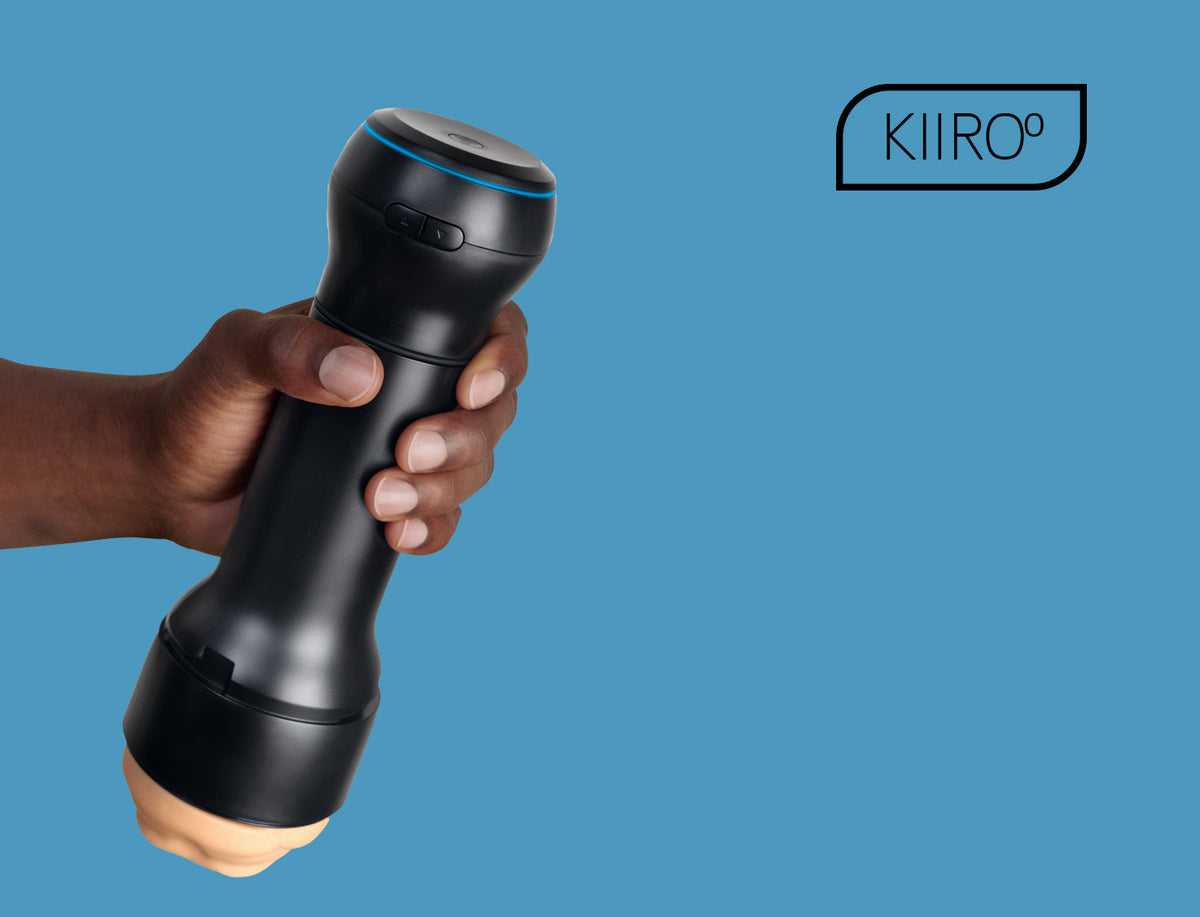
The PowerBlow is Kiiroo's automatic blowjob machine, a vacuum-driven suction unit that screws directly onto any compatible Kiiroo stroker to demonstrate how to simulate a blowjob with realistic air pressure. Instead of relying solely on the mechanical glide of a stroker or the vibration of a motor, it creates a rhythm of pulling, holding, and releasing air to recreate the sensation of oral suction.
Whether you are looking to build your first setup or upgrade an existing system, knowing how to use the PowerBlow correctly ensures you get the best performance out of your device. We will walk you through choosing your variant, initial setup, using all three modes, routine cleaning, and integrating the device into the wider Kiiroo modular system.
Choose Your Setup: With or Without Stroker
The PowerBlow is available in two distinct configurations on the product page. Choosing the right option depends on the gear you already own:
-
Stroker Included: This bundle includes the FeelStroker collection Mouth sleeve (TPE sleeve, ABS+PC casing, 235 mm total length, 542 g). It gives you a complete, working setup out of the box.
-
Stroker Not Included: This includes the standalone suction device only. Select this option if you already own a compatible Kiiroo stroker.
Compatibility Requirements
The device attaches to various PowerBlow-compatible strokers, including the FeelStroker collection, FeelStars, and the Feel Pocket. Pairing it with smaller sleeves creates a compact Feel Pocket + PowerBlow combo.
It works exclusively with Kiiroo hardware. Third-party sleeves (such as Fleshlight or Doc Johnson) are not supported because the air seal and attachment points are engineered specifically for Kiiroo’s housing dimensions.
What's in the Box
Every purchase includes the essential hardware and software access needed to start:
-
PowerBlow suction device
-
USB charging cable
-
Quickstart Guide
-
Free 1-month FeelMe AI trial
-
Free FeelConnect app access
-
FeelStroker Mouth sleeve (included only with the "Stroker Included" variant)
All units include a standard 1-year manufacturer warranty.
What Is the PowerBlow?
The unit is a vacuum-based accessory designed to add controlled suction to your sessions. By generating internal pressure changes, it pulls air out of the attached sleeve to mimic realistic oral suction. Learning how to use the PowerBlow effectively allows you to customize the pressure level to match your preference.
Key Hardware Specifications
-
Top Diameter: 78 mm
-
Base Diameter: 60 mm
-
Height: 72 mm
-
Weight: 198 g
-
Materials: ABS plastic, internal PU foam, silicone sealing ring
-
Connectivity: Bluetooth via the FeelConnect App (iOS and Android)
-
Control Modes: Manual, Automatic, and App-controlled
Note: The main suction housing contains electronic components and is not waterproof. While you can wash the removable TPE stroker sleeve with water, keep the electronic unit dry at all times.
System Integration
The unit works as a standalone attachment or as part of a larger setup:
-
Attaches directly to all standard PowerBlow-compatible strokers and sleeves like the Feel Pocket and the FeelStroker collection.
-
Stacks with the Keon for combined automatic stroking and suction.
-
Stacks with the PowerShot for simultaneous suction and vibration (requires a PowerShot Compatible Stroker Case).

Getting Started: Charging and Pairing with FeelConnect
Follow these steps to set up your device for its first session:
-
Charge the Device: Connect the USB cable to the charging port. A full charge takes roughly 60 minutes. The LED indicator on top turns solid green when charging is complete.
-
Keep Away from Water: Do not charge or operate the electronic unit near water or moisture.
-
Activate Warranty: Register your purchase on the Kiiroo website to activate your 1-year warranty coverage.
-
Download the App: Install the free FeelConnect app from the iOS App Store or Google Play Store.
-
Pair via Bluetooth: Turn on the device, open FeelConnect, select "Add Device," and choose your unit from the list to pair.
-
Attach to Stroker: Screw the unit onto the base of your Kiiroo stroker casing until it seats firmly against the seal to ensure an airtight lock.
-
Apply Lubricant: Apply a generous amount of water-based lube inside the TPE sleeve. Avoid silicone-based lubricants, as they degrade the sleeve material over time.
Three Ways to Use PowerBlow
You can operate the unit manually using physical buttons, set it to an automatic loop, or connect it to the app for expanded control. Once you understand how to use the PowerBlow across these options, you can switch modes depending on your mood.
|
Mode |
Needs app? |
Best for |
|
Manual |
No |
Direct, moment-to-moment suction control |
|
Automatic |
No |
Hands-free with a built-in repeating pattern |
|
App-controlled |
Yes |
Full customization, saved patterns, partner play |
Manual Mode
Manual mode lets you adjust suction on the fly without opening a phone app.
-
Power On: Press and hold the Power/Mode button for 1 second. The LED turns solid white to confirm Manual mode is active.
-
Increase Suction: Press and hold the Arrow Up button to ramp up vacuum strength.
-
Release Air / Decrease Suction: Press and hold the Arrow Down button to vent air and lower pressure.
-
Pause Session: Press the Power button once. The LED blinks purple while paused. Press it again to resume.
-
Power Off: Press and hold the Power/Mode button until the LED turns off.
Automatic Mode
Automatic mode runs a continuous, hands-free vacuum rhythm.
-
Activation: Press and hold the Power/Mode button to cycle from Manual into Automatic mode. The LED indicator turns pink.
-
Operation: The unit executes a continuous suction-and-release loop at a default 50% intensity level.
-
Adjustments: Button controls for pausing and powering down operate the same as in Manual mode. To change intensity levels beyond the 50% default cap, switch to App-controlled mode.
App-Controlled Mode
Connecting through the FeelConnect app unlocks advanced features and custom settings:
-
Adjust vacuum pressure continuously beyond the default limits.
-
Create and save custom suction rhythms.
-
Sync vacuum patterns with Interactive Content, VR videos, or FeelMe AI real-time video analysis.
-
Enable long distance play by passing device controls to a partner remotely.
PowerBlow in the Kiiroo Modular Ecosystem
Kiiroo designs its devices around a modular system. You can stack accessories onto a single sleeve to mix stroking, suction, and vibration.
1. Standalone Setup
-
Components: PowerBlow + Kiiroo Stroker
-
Function: Screws onto any compatible stroker to add targeted vacuum suction to the tip of your sleeve.
2. Stroking + Suction
-
Components: PowerBlow + Keon + Kiiroo Stroker
-
Function: Mount the unit onto your stroker, then insert the whole piece into the Keon automatic stroker. This setup gives you motorized stroking and air suction at the same time. It works with both the original Keon and the Keon 2.
3. Suction + Vibration
-
Components: PowerBlow + PowerShot + PowerShot Compatible Stroker Case + FeelStar Sleeve
-
Function: Place your sleeve inside the PowerShot Compatible Stroker Case to align the PowerShot vibration motors along the shaft. Screwing the suction unit on top adds vacuum pressure directly to the vibrating setup.
4. Full Modular Setup
-
Components: PowerBlow + Keon + PowerShot + PowerShot Compatible Stroker Case
-
Function: Combines automated stroking, dual-motor vibration, and vacuum suction into one system using the Kiiroo Modular Range hardware.
Cleaning and Maintenance
Proper care and maintaining good sex toy hygiene and cleaning habits keep the internal vacuum seals working efficiently and protect the materials. Learning how to use the PowerBlow safely includes keeping the electronics dry while keeping your sleeves sanitized.
Cleaning the PowerBlow Unit
-
Do Not Submerge: The electronic housing is not waterproof. Never submerge it or hold it under running water.
-
Wipe Down: After use, wipe the exterior clean with a damp cloth.
-
Sanitize: Spray a dedicated Kiiroo Toy Cleaner onto a cloth and wipe the body. Avoid alcohol, harsh detergents, or acetone, which break down plastic seals and foam.
Cleaning the Stroker Sleeve
-
Remove the TPE sleeve from its hard plastic casing after every session.
-
Rinse thoroughly under lukewarm running water using mild soap or toy cleaner.
-
For detailed sleeve care steps, refer to our complete guide on how to clean sex toys.
-
Allow the sleeve to air-dry completely.
-
Dust the dry sleeve with FeelNew Refreshing Powder to maintain its smooth texture and prevent stickiness. Browse our lube & after-care line for maintenance supplies.
Replacing the Absorbent Foam
The internal PU foam ring absorbs excess moisture and maintains stable vacuum pressure. Replace the foam insert regularly when it shows wear or moisture saturation to maintain hygiene and suction quality. Replacement packs are available as a standalone PowerBlow Absorbent Foam Pack.
Storage Guidelines
Store the unit in a cool, dry area away from direct sunlight. Keep TPE sleeves stored separately from other silicone items to prevent the materials from reacting and bonding together.



How to Use the Kiiroo PowerShot
Best Free VR Porn: Freemium & Fully Free Sites Worth Trying